Editing Brackets & Match Progression

Fine-tune match-ups after the draw is built.

Tournament & League Software
More R2 Sports Software

Editing a Bracket

Fine-tune match-ups after the draw is built.

Last updated November 3, 2026
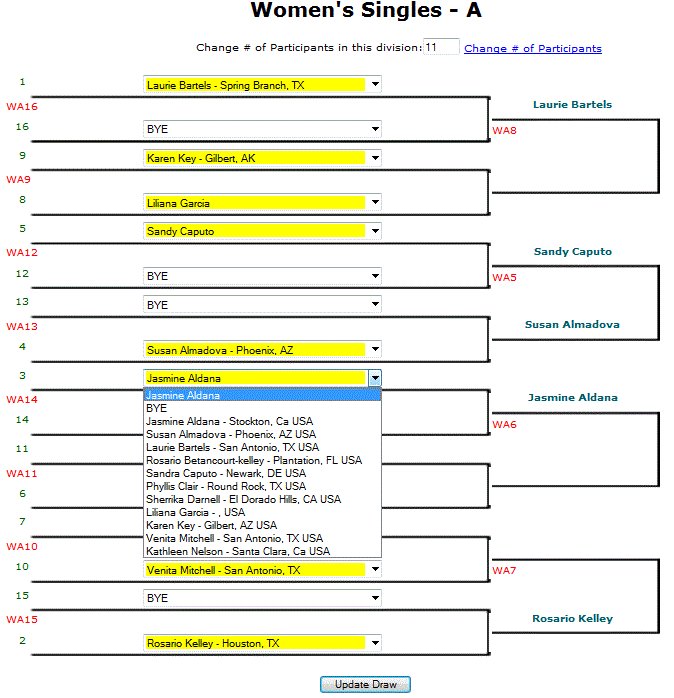
Editing Brackets & Match Progression screen in R2 Sports

Click the screenshot to enlarge

Instructions

Step 1

Seed the draw first.

Seeding and Creating Draws Guide

Step 2

Open Edit on Tournament Bracket.

See This Screen

Step 3

Use the dropdown on a first-round spot to switch players, such as doubles partners or players from the same club.

Pairing Doubles Partners Guide

Step 4

To give more byes, expand the draw. An 11-player draw can become a 32 draw.

See This Screen

Step 5

To move a bye to a lower seed, change it here.

See This Screen

Step 6

Save.

See This Screen

Good to know: Every change shows on the event website right away.

Related guides

All Bracket Setup Guides

View All

Bracket Format Settings

View Guide

Seeding and Creating Draws

View Guide

Bracket Points

View Guide

See It in Action

Try the R2 Sports demo free. No credit card needed.

Try It Free   See Pricing

Demo Software

Start Free Demo

Purchase

Buy Software

Advertise

View Packages

System Login

Access Account

Learning Hub

Watch Videos

Event Portal

Find Events | Featured