Printing Brackets & Desk Sheets

Print several brackets at once.

Tournament & League Software
More R2 Sports Software

Printing Brackets

Print several brackets at once.

Last updated November 3, 2026
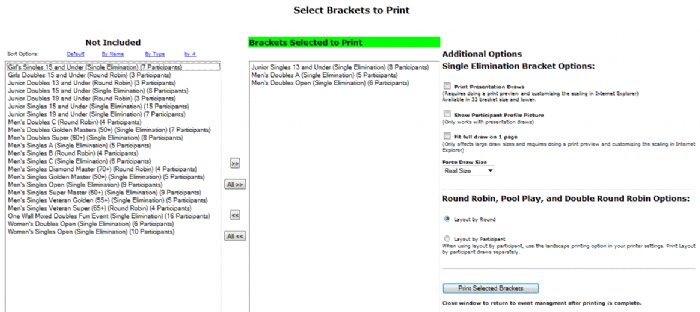
Printing Brackets & Desk Sheets screen in R2 Sports

Click the screenshot to enlarge

Instructions

Step 1

Open the printable bracket page.

See This Screen

Step 2

Click a division on the left, then click >>. Use All >> for every division.

Divisions and Entry Rules Guide

Step 3

Choose print options on the right. For a large draw, use fit to 1 page, or start at a later round.

See This Screen

Step 4

For round robin and pool play, choose by round or by player.

See This Screen

Step 5

Click Print Selected Brackets.

See This Screen

Step 6

In print preview, set margins to 0.25 and clear headers and footers. Use portrait for 16 and up.

See This Screen

Good to know: To show logos, turn on background images in your browser's print options. Need a blank one? Use free printable brackets.


Related guides

All Bracket Setup Guides

View All

Editing a Bracket

View Guide

Bracket Points

View Guide

Splitting Divisions

View Guide

See It in Action

Try the R2 Sports demo free. No credit card needed.

Try It Free   See Pricing

Demo Software

Start Free Demo

Purchase

Buy Software

Advertise

View Packages

System Login

Access Account

Learning Hub

Watch Videos

Event Portal

Find Events | Featured