Software Screenshots & How-To Guides
Want to see how R2 Sports works before you use it? These guides show the real screens, step by step, with a plain-English explanation of each one.
Pick the part of R2 Sports you use most: tournaments and leagues, memberships, online registration, association websites, or rankings.

Click the screenshot to enlarge
Online Registration
9 guides. See every step a player goes through to sign up for your event online, from the Enter Now button to the receipt.
View GuidesChallenge Ladders
31 guides. See how a free R2 Sports challenge ladder works, screen by screen.
View GuidesEvent Setup
The setup wizard walks you through the main event settings step by step. After that, add the extras that make your event stand out, like add-on items, a home page message, and sponsors.

Click the screenshot to enlarge
Director Home Dashboard
The director home page is the first thing you see after you log in.
View GuideEvent Setup Wizard & Templates
When you activate an event, the setup wizard walks you through the main settings: dates, times, registration deadlines, prices, and the divisions you'll offer.
View GuideEvent Options & Registration Deadlines
This setup page is where you set your event dates, daily start and end times, and registration deadlines.
View GuideDivision Settings & Entry Rules
Add divisions from a list made for your sport, then set prices and entry rules for each one.
View GuideRegistration Add-On Items
Add extra items players can buy while they register, like banquet tickets, extra shirts, or a donation.
View GuideEvent Messages & Home Page Text
Write a message for your event home page and change it any time.
View GuideParticipants
Once players register online, these tools help you keep the roster clean, check people in on game day, pair doubles partners, and let fans follow the action.

Click the screenshot to enlarge
Event Check-In List
The check-in list shows every player, whether they've checked in, and if they still owe money.
View GuideRegistration Desk Check-In
This view gives your desk staff everything they need to check a player in: entries, payments, and divisions, all on one screen.
View GuideFinding Players
Search for players by name and filter the results so you can find the right person, even in a big event.
View GuidePairing Doubles Partners
Players can pick their own doubles partner when they register, or mark that they need one.
View GuideAuto-Created Event Websites
R2 Sports builds your event website automatically as you go through setup.
View GuideBrackets
Pick a format for each division, seed the players, and let R2 Sports build the draw. Winners move forward on their own as scores are entered.

Click the screenshot to enlarge
Bracket Format Settings
Choose a bracket format for each division, like single or double elimination, round robin, or pool play.
View GuideSeeding Brackets & Creating Draws
Enter each player's seed and click Update Seeding, and R2 Sports builds the draw.
View GuideBracket List & Division Directory
The bracket list shows every division in your event with its format and number of players.
View GuidePrinting Brackets & Desk Sheets
Print brackets and round robin sheets for your desk and walls.
View GuideMatch Times
Set times one match at a time or let the auto scheduler do it. R2 Sports watches for players booked in two places at once and flags the problem before it happens.
Click the screenshot to enlarge
Time Grid Planner
The time grid shows every match by court and time for one location and day.
View GuideMatch Time Settings
The View and Set Times page lists every match in your event and shows how many still need a time.
View GuideMatch Scheduler
The tournament scheduler is where you control all match times in your event.
View GuideSetting Match Times
Pick matches from a bracket or the grid and set their times on one screen.
View GuideFixing Schedule Conflicts
When players enter more than one division, scheduling gets tricky.
View GuidePlayer Time Requests
Players can type time requests when they register, like "Can't play before 2 PM Friday." You decide which to grant.
View GuideMatch Report
The match report lets you search matches across your event, set times for many at once, and print scorecards.
View GuideResults
When the last match ends, turn results on to publish a summary of every division. Then use the media report and event stats for press, sponsors, and next year's planning.

Click the screenshot to enlarge
Media Match Report
The media report lets players, fans, and press look up matches and results in different ways during and after the event.
View GuideTournament Statistics
Event stats show who signed up and how, with charts that make it easy to compare to past events.
View GuideMembership
Sell memberships online, renew whole rosters, certify referees, and sanction events. See all membership guides.

Click the screenshot to enlarge
Online Registration
See every step a player goes through to sign up for your event online, from the Enter Now button to the receipt. Players can change their entry as many times as they need until the deadline.

Click the screenshot to enlarge
Event Home Page & Enter Now Button
Every event gets a home page that updates itself as the event moves along.
View GuideStep 1: Verify Your Profile
The first registration step asks players to check that their profile is correct before they choose divisions.
View GuideStep 3: Entry Summary & Add-Ons
The entry summary shows every division picked and the total due.
View GuideStep 4: Choose a Payment Type
After confirming the summary, players move to a secure page to choose how to pay.
View GuideEvent Websites
Give your association a website that updates itself. Event listings, rankings, and results pull straight from your tournaments and leagues, and an easy control panel lets your staff manage news, photos, and pages without a programmer.

Click the screenshot to enlarge
Association Website Home Page
Your association website pulls event info straight from the tournament and league software.
View GuideWebsite Designs & Languages
Your events website is designed to match the look and colors of your main organization website, so visitors feel like they never left.
View GuideState & Regional Sites
National organizations can have a separate events site for each state or city organization under them.
View GuideUpcoming & Recent Events
Your website lists upcoming events and recent results without anyone typing them in.
View GuidePhoto Gallery
The photo gallery lets you share pictures from all your events, like winners getting their prizes and action shots of players.
View GuideEvents Calendar
The events calendar shows your association's tournaments, leagues, and camps by date, so members can plan ahead.
View GuideWebsite Control Panel
Anyone you give access to can update your website from the control panel.
View GuideNews & Articles
Write and post articles from the control panel to keep members up to date on results, rule changes, and announcements.
View GuideRankings
Stop tracking rankings by hand. Your tournaments and leagues send match results straight to the ranking system, and players can search rankings and match history on your website.

Click the screenshot to enlarge
Searchable Player Rankings
A rankings tab on your website takes visitors to your rankings.
View GuidePlayer Match History
Each player has a match history that shows all their events in your organization.
View GuideSeed Brackets from Rankings
When your event is linked to the ranking system, directors can pre-seed divisions from the latest rankings instead of entering seeds by hand.
View GuideCheck Player Rankings by Division
Directors can view each division with every player's ranking listed.
View GuideChallenge Ladders
See how a free R2 Sports challenge ladder works, screen by screen. Directors set the rules once, and players join, challenge, and report scores themselves while the ladder updates its own rankings.
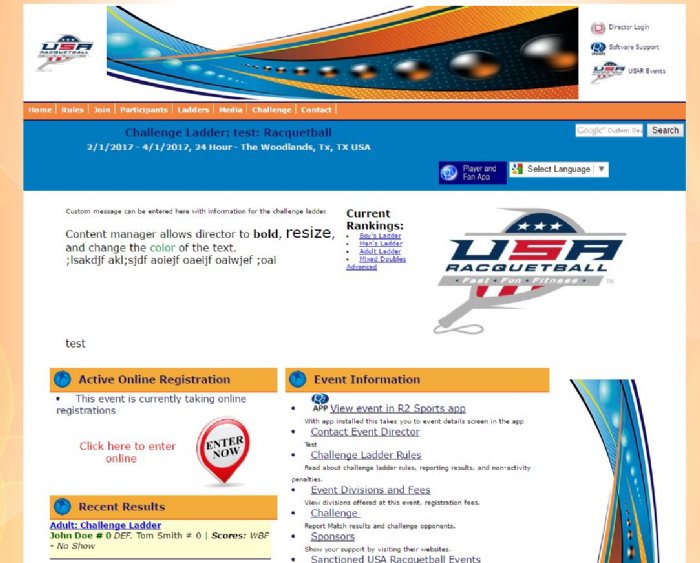
Click the screenshot to enlarge
Challenge Ladder Home Page
Every ladder gets its own website, built automatically when the director finishes setup.
View GuideChallenge Ladder Rankings
The rankings page shows every player's current spot on the ladder.
View GuideLog In to Join a Ladder
Players click Join on the ladder website, then log in or create a free account.
View GuideEnter Player Profile Info
New players fill in a short profile so the director and opponents can reach them.
View GuideStart Ladder Registration
Before choosing divisions, players check that their profile is correct.
View Guide