e
Smart Logic to Structure Your Fields Fairly
Settings for Tournament Divisions & Restrictions
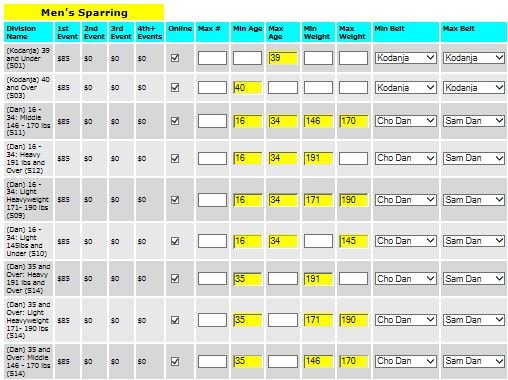
The division configuration interface provides absolute, itemized control over how entries are structured across your brackets. From the dashboard, directors click the link to populate active brackets from a sport-specific master division list. To ensure maximum financial flexibility for every organizer, you can easily customize pricing parameters on a per-division basis, allowing you to establish up to 4 dynamic fee tiers along with a flat baseline entry fee.
Automating Division Eligibility & Restrictions
When competitors register, they shouldn't have to wade through a cluttered list of hundreds of open brackets. The R2 Playbook incorporates an intelligent filtering engine that automatically isolates the exact brackets a competitor is eligible to join. Powered by GamePlay Intelligence, this workflow makes it incredibly easy for grassroots athletes to select the right category while cleanly preventing accidental or incorrect sign-ups. You can quickly configure these safeguards by going to Setup → Set Divisions Offered and clicking Set Division Restrictions to activate 5 core validation pillars:
- Maximum Entry Capacity: Establish a firm division cap or leave it blank for unlimited bracket sizes. Once your custom ceiling is hit, online registration for that division locks down instantly, though directors retain backend bypass control to manually add players if desired.
- Online Entry Lockout: Toggle public visibility anytime by unchecking the online registration box next to any group. When switched off, entry control becomes completely private, locking additions down strictly to the director dashboard.
- Age-Range Verification Checks: Speed up setup by loading sport-specific age parameter defaults with a single click. When a participant signs up, the system automatically runs their required date of birth against your bracket thresholds—meaning an older player instantly and seamlessly skips seeing younger divisions.
- Weight Class Restrictions: Ideal for wrestling or combat brackets. Simply toggle "Require Weight" to YES in your event options, preload your customized target thresholds, and let the software filter entry pathways automatically.
- Martial Arts Belt & Rank Ranges: Built explicitly for martial arts disciplines. By toggling "Require Belt" to YES, competitors are prompted to enter their official rank, instantly filtering the division view down to their exact minimum and maximum rank permissions.
No matter the size of your organization, the R2 Playbook acts as your background digital inspector. It handles the verification logic and filters bracket fields silently, protecting your timeline from administrative mistakes so you can spend your valuable weekend hours at the courts instead of tracking roster corrections.