Instructional Manual: Scheduling Interface
Tournament Scheduling Software: View & Set Times
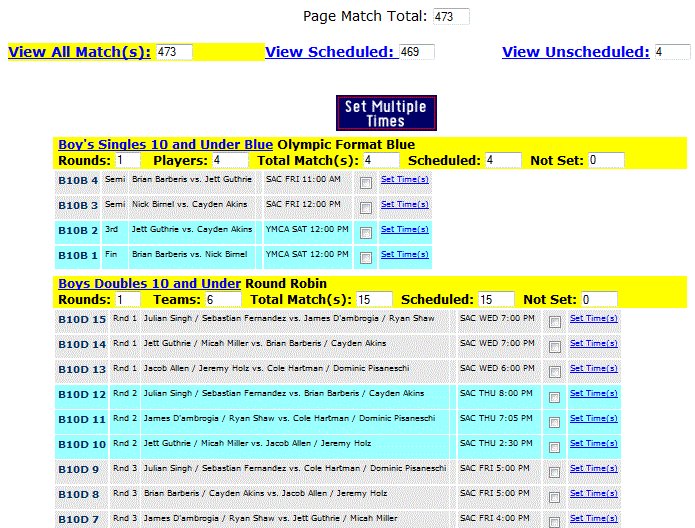
The "View and Set Times" page is a dedicated control interface designed for directors to finalize match times for all tournament draws. It provides a clean, filtered view of every match within the event, allowing for rapid scheduling.
Scheduler Interface Overview
- Match Status Dashboard: The top of the page displays the total number of matches remaining to be scheduled. Use the filter controls to toggle between "All Matches," "Scheduled Only," or "Not Yet Scheduled" to isolate your workflow.
- Division Organization: Each division is highlighted in yellow. The division name is a live link that navigates you directly to the full bracket view. Below the name, the interface lists critical division data:
- Number of rounds and competitors.
- Total matches in the division.
- Breakdown of scheduled vs. unscheduled matches.
- Batch Scheduling: Matches are grouped by round using alternating gray and light-blue background colors.
- If a participant has a time conflict, it is flagged next to their name.
- Select multiple matches using the check boxes provided.
- Click the "Set Times" link next to any check box to mass-schedule the selected group.
Operational Best Practices
Utilize this interface as the final verification step to ensure event readiness:
- Post-Manual Scheduling Check: After manually scheduling matches, use this page to confirm that the "Not Yet Scheduled" count for every division is zero.
- Dynamic Updates: Once times are set, the system automatically propagates the new schedule to the Tournament Planner Grid.
- Strategic Timing: This tool is particularly effective for setting matches after the first two rounds of a draw, once you have already accounted for initial personal time conflicts and player availability.