Instructional Manual: Data Analysis
Match Report: Advanced Search & Analytics
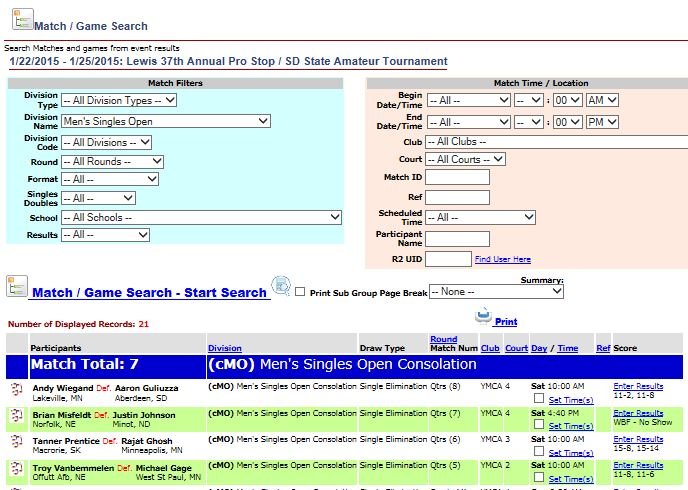
The Match Report is the director’s primary tool for forensic match searches and data analysis. It provides the ability to filter and extract specific match data across your entire tournament or across multiple events.
Filtering & Search Controls
Apply filters to isolate specific match sets by:
- Division Filters: Division type, name, code, round, draw format, and singles/doubles status.
- Match Data: Start/end times, venue, court/field number, match ID, referee name, participant name/ID, school, and "Results Entered" status.
Director Operations
- Batch Actions: Set match times for multiple games simultaneously by checking boxes and clicking "Set Time."
- Direct Entry: Links are provided to enter scores directly from the report and to print scorecards for matches where results are still pending.
- Dynamic Sorting: Click any column header to re-sort the report. This is essential for printing referee schedules, upcoming match lists, or identifying unscheduled matches.
Analytics & Summary Reporting
- Summary Dropdown: Create an overall summary report for your query. Compare performance across players, schools, cities, states, and countries with automatically generated charts displaying win/loss ratios, games won/lost, and points scored vs. allowed.
- Cross-Event Comparison: Aggregate results from multiple events into a single report, a powerful tool for assisting with bracket seeding.
- Matchup Summary: Display a division-wide matchup summary to compare how specific players fared against everyone else in their division.