Instructional Manual: Avoiding Conflicts
Tournament Scheduling Without Conflicts
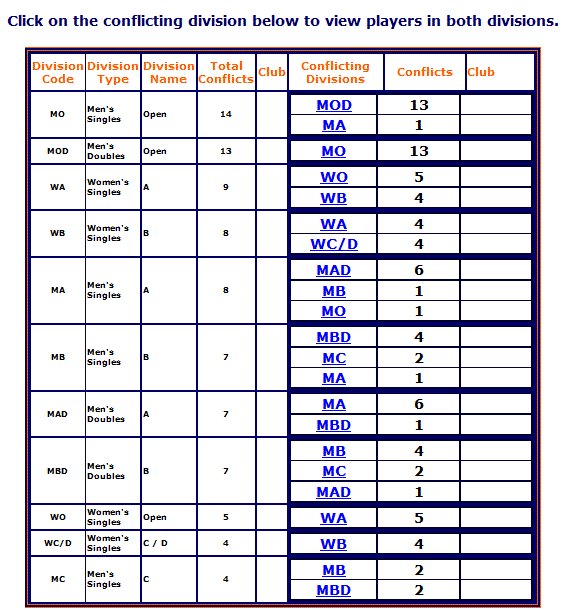
Events that allow participants to enter more than one division present a significant scheduling challenge. Use the Conflicting Divisions page to make data-driven decisions on when and where to schedule matches.
Utilizing the Conflicting Divisions Page
- Identifying Overlaps: The page identifies divisions with overlapping participant pools. For example, if a division has 14 participants, the system details exactly how many are also registered in other divisions (e.g., 13 in Men’s Doubles, 1 in Singles A).
- Deep-Dive Analysis: Click the linked division code in the "Conflicting Divisions" column to instantly view a list of all participants shared between the two divisions.
Venue & Timing Strategy
- Multi-Venue Logistics: When using multiple venues that are not in close proximity, schedule conflicting divisions at the same location. This prevents players from having to travel between facilities, which frequently causes match delays.
- Timing Synchronization: Use the conflict data to stagger starts. For example, do not schedule "Men’s Singles Open" and "Men’s Doubles Open" simultaneously, as your core athlete pool is the same for both.
- Safe Scheduling: You can safely schedule divisions like "Men’s B Singles" and "Men’s Open Singles" at the same time, provided the system confirms those divisions share zero participants.