Instructional Manual: Managing Participant Constraints
Tournament Maker: Handling Registration Conflicts
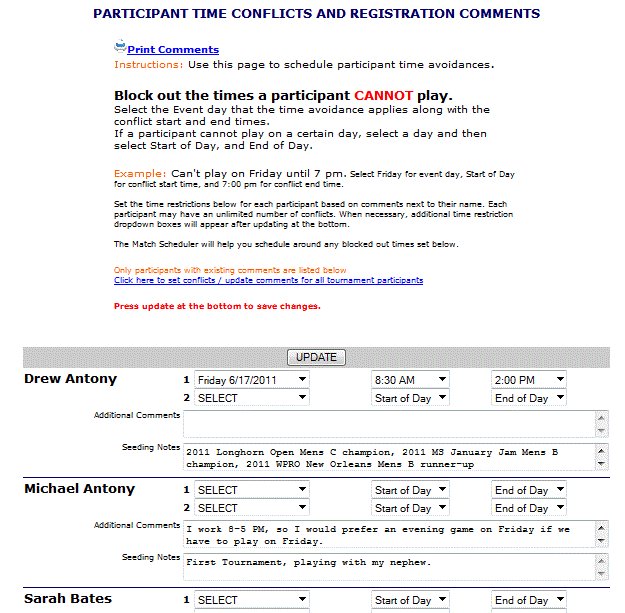
When participants register online, they can submit personal time conflicts and seeding considerations. These fields are configurable within your Tournament Template settings. The Tournament Maker Comments page provides a centralized view of all registration-submitted notes.
Managing Conflict Requests
- Comment Management: Use the update link to modify comments for all participants or manually add a new comment for any player who currently has none.
- Granting Conflicts: It is at the director's discretion to grant a conflict. To grant one, you must manually block out the specific times the competitor is unavailable.
- Time Restriction Settings:
- Start of Day: Select this if a participant cannot play from the beginning of the day.
- End of Day: Use this if a player has a hard deadline and can only play before a certain time.
Automated Logic & Expansion
- Scheduler Integration: When using the Auto Match Scheduler, the system references these blocked periods and automatically pushes matches outside of the restricted windows.
- Grid Warnings: Once granted, time conflicts appear next to the player’s name during scheduling and are color-coded in yellow on the schedule grid to serve as a visual director's warning.
- Unlimited Restrictions: By default, the system provides 2 restriction slots per participant. Pressing the "Update" link at the bottom of the page generates 2 additional slots. This process can be repeated as many times as necessary to accommodate players with complex, unlimited conflict needs.