Challenge Ladder Screenshots
See how a free R2 Sports challenge ladder works, screen by screen. Directors set the rules once, and players join, challenge, and report scores themselves while the ladder updates its own rankings.
Part of the R2 Sports free challenge ladder software. Try the free demo.
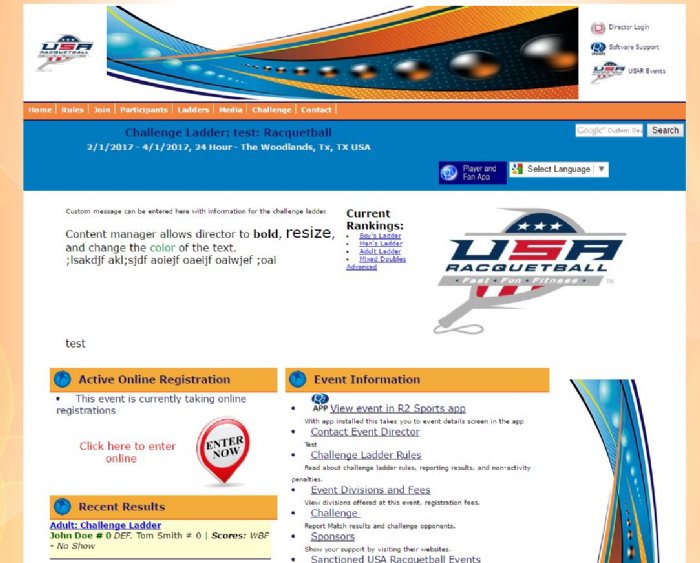
Click the screenshot to enlarge
Ladder Website
The ladder home page, rules, and rankings players see.
Challenge Ladder Home Page
Every ladder gets its own website, built automatically when the director finishes setup.
View GuideChallenge Ladder Rankings
The rankings page shows every player's current spot on the ladder.
View GuideJoin a Ladder
How players sign up and enter ladder divisions.
Log In to Join a Ladder
Players click Join on the ladder website, then log in or create a free account.
View GuideEnter Player Profile Info
New players fill in a short profile so the director and opponents can reach them.
View GuideStart Ladder Registration
Before choosing divisions, players check that their profile is correct.
View GuideLadder Registration Receipt
After joining, players see a receipt confirming their divisions.
View GuideMaking Challenges
Challenge an opponent, accept, and report the score.
See Available Challenges
The ladder shows each player exactly who they're allowed to challenge, based on the rules the director set.
View GuideView Pending Challenges
The pending challenges page shows every challenge a player has open, so nothing gets forgotten.
View GuideAutomatic Emails
The emails the ladder sends so you don't have to.
Email Verification Message
This email asks the player to confirm their email so they get every challenge and update.
View GuideNew Challenge Email
When someone challenges a player, this email tells them who challenged and how to respond.
View GuideChallenge Accepted Email
Once a challenge is accepted, both players get this email with each other's contact info so they can set a time.
View GuideNo-Response Warning Email
If a player hasn't answered a challenge, this email reminds them before the deadline passes.
View GuideForfeit for No Response Email
If a player never answers, the challenge is forfeited and this email lets them know.
View GuideOpponent Forfeit Notice
The challenger is told their opponent didn't respond and the forfeit has been recorded.
View GuideCanceled Match Email
If a challenge is canceled, both players get an email so nobody shows up for a match that isn't happening.
View GuideChallenge Result Email
Once a result is reported, both players get an email with the score so they can confirm it's right.
View GuideNon-Activity Warning Email
If a player hasn't played in a while, this email reminds them to make or accept a challenge before a penalty kicks in.
View GuideNon-Activity Penalty Email
If a player still doesn't play, they get a non-activity penalty and move down the ladder.
View GuideDirector Tools
Set up the ladder, set the rules, and fix rankings.
Set Up Your Ladder
Directors go through a short setup to name the ladder, set dates, and customize the ladder website.
View GuideLadder Challenge Settings
Directors choose the rules that make the ladder fair and active.
View GuideEdit Ladder Rankings
If a result was reported incorrectly, the director can edit the rankings directly.
View GuideMore Screenshot Guides
Online Registration
See every step a player goes through to sign up for your event online, from the Enter Now button to the receipt.
View Guides