Bracket Format Settings

Every division starts as single elimination.

Tournament & League Software
More R2 Sports Software

Bracket Format Settings

Every division starts as single elimination. Change it here.

Last updated November 3, 2026
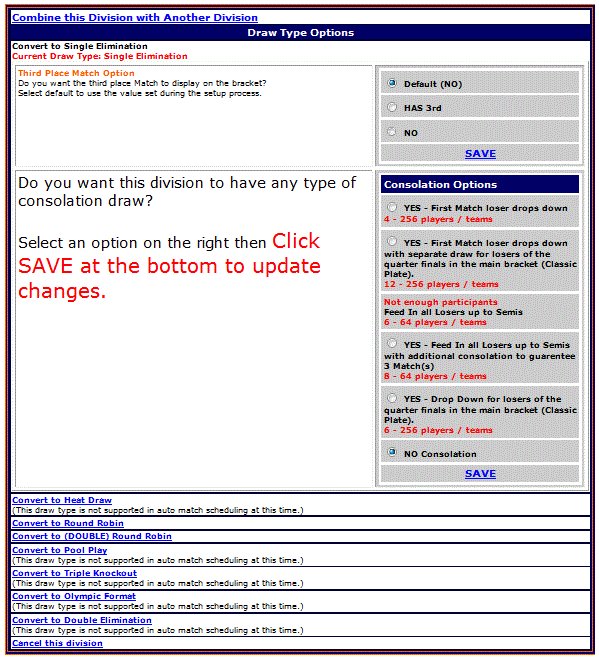
Bracket Format Settings screen in R2 Sports

Click the screenshot to enlarge

Instructions

Step 1

After the deadline, decide if small divisions need combining.

Divisions and Entry Rules Guide

Step 2

Open the division options icon.

See This Screen

Step 3

Choose whether to have a 3rd place match. This overrides your event-wide setting.

See This Screen

Step 4

Add a consolation bracket if you want one.

See This Screen

Step 5

Convert to another format if needed, like round robin, pool play, double elimination or heats.

See This Screen

Step 6

Save. Your seeds carry over.

Seeding and Creating Draws Guide

Good to know: Not sure which to pick? See tournament bracket formats.

Related guides

All Bracket Setup Guides

View All

Bracket List

View Guide

Seeding and Creating Draws

View Guide

Editing a Bracket

View Guide

See It in Action

Try the R2 Sports demo free. No credit card needed.

Try It Free   See Pricing

Demo Software

Start Free Demo

Purchase

Buy Software

Advertise

View Packages

System Login

Access Account

Learning Hub

Watch Videos

Event Portal

Find Events | Featured