Event Check-In List

Check players in at a busy front desk.

Tournament & League Software
More R2 Sports Software

Event Check-In List

Check players in at a busy front desk.

Last updated November 3, 2026
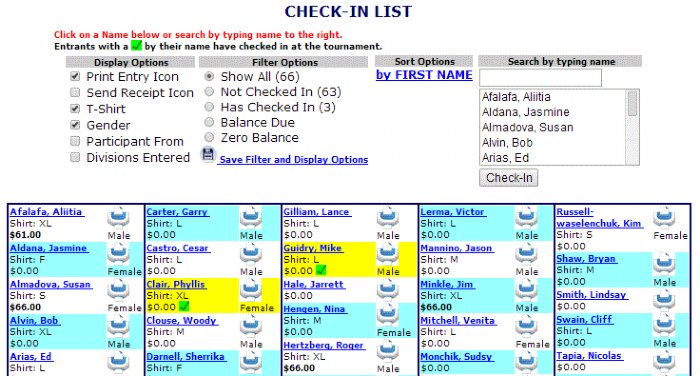
Event Check-In List screen in R2 Sports

Click the screenshot to enlarge

Instructions

Step 1

Open the event check-in list.

See This Screen

Step 2

Choose your details, like T-shirt size, hometown or divisions.

Divisions and Entry Rules Guide

Step 3

Filter by checked in, not checked in, balance due or no balance.

See This Screen

Step 4

Type a few letters of the name, or click it in the list.

See This Screen

Step 5

Click check-in. Checked-in players are highlighted in yellow.

See This Screen

Good to know: Amounts owed show in red. Filters stay set until you change them.

Related guides

All Participant Guides

View All

Finding Players

View Guide

Pairing Doubles Partners

View Guide

Registration Desk Check-In

View Guide

See It in Action

Try the R2 Sports demo free. No credit card needed.

Try It Free   See Pricing

Demo Software

Start Free Demo

Purchase

Buy Software

Advertise

View Packages

System Login

Access Account

Learning Hub

Watch Videos

Event Portal

Find Events | Featured