Pairing Doubles Partners

Every doubles team needs two players before you create a draw.

Tournament & League Software
More R2 Sports Software

Pairing Doubles Partners

Every doubles team needs two players before you create a draw.

Last updated November 3, 2026
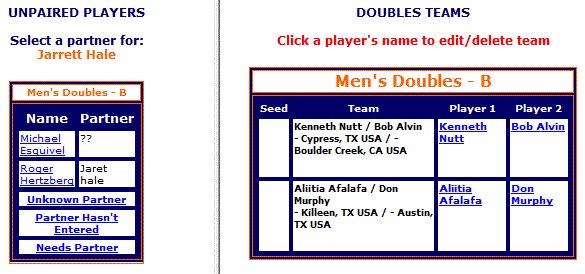
Pairing Doubles Partners screen in R2 Sports

Click the screenshot to enlarge

Instructions

Step 1

Open the doubles pairing page.

See This Screen

Step 2

The left side lists unpaired players. The right side lists teams.

See This Screen

Step 3

Select two players on the left to make a team.

See This Screen

Step 4

If a partner is unknown, create a team marked as needing a partner.

See This Screen

Step 5

To break up a team, click a player's name on the right.

See This Screen

Step 6

To let players pick partners at sign-up, go to Setup, then Set Main Event Info, and set Select Doubles Partner to Yes.

See This Screen

Good to know: If you unpair a team already in a draw, a bye takes its place.

Related guides

All Participant Guides

View All

Participant Lists

View Guide

Finding Players

View Guide

Event Check-In List

View Guide

See It in Action

Try the R2 Sports demo free. No credit card needed.

Try It Free   See Pricing

Demo Software

Start Free Demo

Purchase

Buy Software

Advertise

View Packages

System Login

Access Account

Learning Hub

Watch Videos

Event Portal

Find Events | Featured