Membership Software Screenshots
These step-by-step screenshots show how the R2 Sports membership management software works. Clubs, associations, and governing bodies use it to sell memberships online, keep a clean member database, certify referees and coaches, and sanction events.
Pick a topic below to see the real screens.
Click the screenshot to enlarge
Membership: General
System setup, home page, access levels, and activity history.
Membership System Home Page
When an admin logs in, the membership home page shows what needs attention first.
View GuideMember Activity History
Each time data is saved or a payment is made, R2 Sports records it in the member activity history.
View GuideMembership System Setup
The setup page controls the main settings for your whole membership system.
View GuideMember Access Levels
Access levels decide which pages each user can open in your membership system.
View GuideMembership: Members
Member profiles, database search, and member emails.
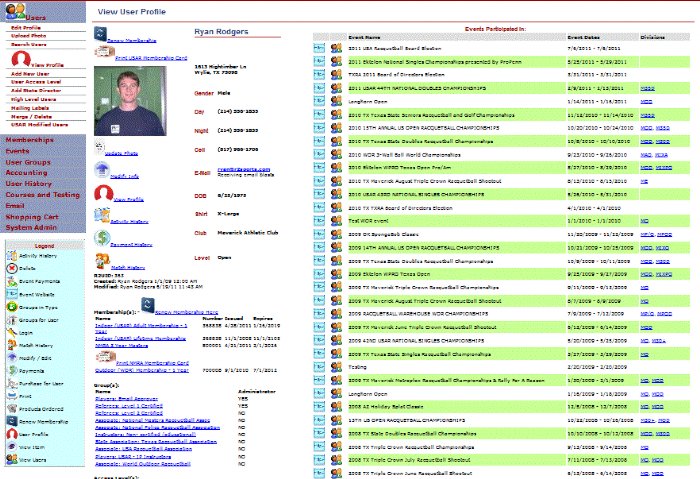
Member Profiles
A member's profile shows their personal info, photo, memberships, groups, and event history together.
View GuideMember Database Search
The member database search lets you filter your whole membership list almost any way you need.
View GuideEmail Your Members
The membership system has a built-in email tool, so you don't need a separate email service to reach your members.
View GuideAutomatic Member Emails
R2 Sports sends emails on its own when something happens, like a new membership, a renewal, or a sanctioning approval.
View GuideMembership: Memberships
Membership types, online sign-up, renewals, and reports.
Membership Types
The membership types list shows everything you offer, grouped by category.
View GuideOnline Membership Sign-Up
Members can buy a membership on your member website, or while they register for an event.
View GuideManage Members by Type
Admins with the right access can manage every member in a membership type from one screen, using the same filters as the database search.
View GuideBulk Membership Renewals
Bulk renewal lets an event director or club renew many members at the same time, instead of one by one.
View GuideMembership Totals Report
The membership summary shows how many members you have in every category and type.
View GuideMembership: Groups
Group members by role, like coaches, refs, and pros.
Member Groups
Groups link members together by role or category, like certified referees, coaches, professionals, or a state or region.
View GuideAdd Members to a Group
Admins can add and remove members from any group and choose which members are group administrators.
View GuideMembership: Online Testing
Online tests, certifications, and printable certificates.
Membership: Sanctioning
Sanction events online, take fees, and activate event software.
Sanctioned Events Search
The events search lets your staff find any event that has been sanctioned through your membership system.
View GuidePay Sanctioning Fees Online
Once a request is approved, the director adds the sanction to their cart and pays online.
View GuideActivate a Sanctioned Event
The last step of sanctioning is activating the event software.
View Guide